Beacon
A keyboard-first desktop API client
A fast alternative to Postman and Insomnia, for people who would rather drive their tools from the keyboard than reach for the mouse every few seconds. Compose requests, chain them into flows, script tests, mock APIs, and pull a response apart in an interactive tree — all stored on your machine.
Install script (recommended)
curl -fsSL https://raw.githubusercontent.com/quizuncle/beacon-releases/HEAD/install.sh | bashOne command. It picks the right build for your Mac, installs it to /Applications, and clears the macOS quarantine flag, so Beacon opens straight away. Read install.sh first
Homebrew
brew tap quizuncle/beacon && brew install --cask beaconIf you already use brew — it picks the right build too, and keeps Beacon updated alongside your other casks.
Or download the DMG
Apple SiliconSHA-2561a220961052d…
1a220961052ddf7ec1470cd83be0d4f8e9ead860d9125ba1ce517832d255e9cfIntelSHA-256e8cefba5193d…
e8cefba5193d021074cd00e8a7d8c4f7a62ca5d2d50eac10740326476baf1c02Not sure which chip you have? Apple menu → About This Mac.
The manual route: drag Beacon into Applications yourself. This is the one path that needs a one-time xattr -cr /Applications/Beacon.app — the two above run it for you. Full install notes
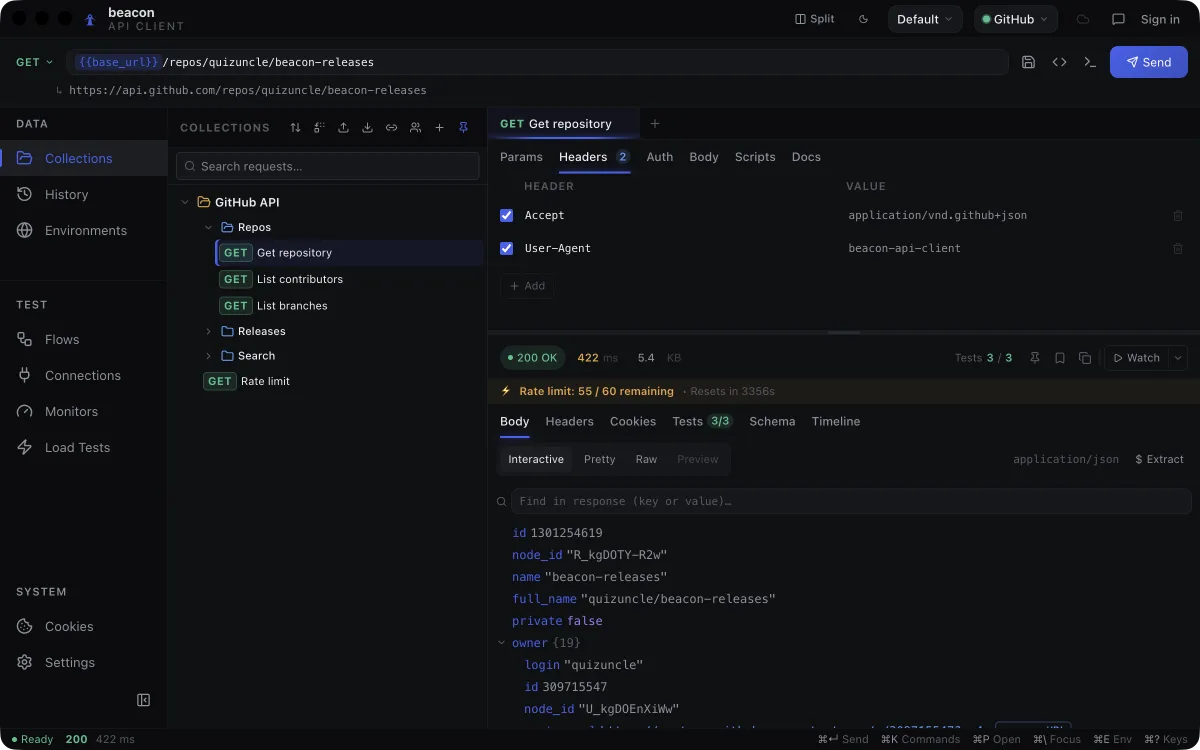
A saved request with {{base_url}} resolved beneath it, and the response as an interactive tree.
What it does
Six things worth knowing
Compose
A request builder that keeps up with typing. Method, URL, params, headers, auth and body sit in one builder, and the URL bar doubles as a command palette.
- GraphQL bodies with the query, its variables and a schema explorer in one split view
- OAuth 2.0 — including Authorization Code with PKCE — alongside bearer, basic and API-key auth
- Environment, collection and global variables, resolved in that order — with a runner data row overriding all three
- Code generation to ten targets: cURL, HTTPie, JS (fetch), Node (axios), Python, Go, Ruby, PHP, C# and Java
See what happened
Most clients hand back a formatted blob you scroll through once. Beacon makes a response something you can interrogate — and watch change.
- Living Response — an interactive JSON tree, searchable by key or value
- Pin a field and it gets charted across sends, beside live latency and status tiles
- Re-send and the tree marks every changed value, with signed deltas on the numbers
- Watch mode re-fires on an interval, turning one endpoint into a small live dashboard
- A request timeline splitting the response into waiting (TTFB), downloading and total
Organize
Collections that stay tidy without a lot of clicking, and a way in from whatever you already have.
- Auth and headers inherited down the collection → folder → request chain
- Find and replace across every collection at once — URLs, headers, query params and JSON or raw bodies — preview the changes, then apply them
- Import from Postman v2.1, OpenAPI 3, Swagger 2 or HAR
- Or paste a curl command straight into the URL bar and it fills the tab, ready to send
Go further
The work you would normally export to a second tool for, run against the request you already built.
- Collection runner with data-driven iterations — attach a CSV or JSON file and each row becomes one iteration
- Flows: chain requests on a visual canvas, feeding one response into the next
- Load testing with live latency percentiles (p50, p95, p99), throughput and error rate
- Compare two finished load tests to confirm a change actually made the endpoint faster
- Export a finished run as JSON, JUnit XML for CI, or a self-contained HTML page — redacted before it is written, with request and response bodies left out unless you ask
- A headless `beacon` command that runs an exported bundle's collections and flows from a terminal or a build, with exit codes a CI step can act on
Everything else in the box
The supporting cast, all included, all running on your machine.
- A local mock server for endpoints that don't exist yet
- A WebSocket client for connecting and exchanging messages
- Monitors that re-run a saved request on an interval while Beacon is open, firing a native notification when its state changes
- Request history — your last 200 sends — plus a per-domain cookie jar that captures and replays automatically
Yours, on your machine
Local-first is the default rather than a setting you have to go and find.
- Collections, environments, history and settings live in a SQLite database on your Mac
- Variable values you flag as secret are encrypted at rest through the macOS keychain; the rest of that database is plain text
- An account is optional — everything but Cloud Sync and publishing a share works without one
- Optional sync encrypts variable values you flagged as secret, plus auth credentials, credential headers and URL userinfo, before upload; names, URLs, non-credential headers, bodies and scripts go up as plaintext, so a token pasted into a body or a script is not protected
- Anonymous usage reporting is on by default — daily feature counts, facts about the install and scrubbed error reports, never your requests, their contents or your scripts — and one switch in Settings → Privacy stops it uploading
- An optional local AI assistant (MCP, off by default, turned on in Settings → MCP / AI access) can read your collections, environments and history, and send requests or run collections and flows through the same engine the app's own UI uses — there's no tool to create, edit, rename or delete anything, only to read, send and run; it can use your saved credentials without ever being shown their values, since everything it reads back is redacted the way a run report is, and the gaps are stated rather than hidden — secrets shorter than four characters, a Basic auth username, a credential typed straight into a saved request's script or a history entry's params row, and any value the AI supplied itself in an ad-hoc request aren't scrubbed
- Ten themes across three groups — Dark, Light and Bloom — and a ⌘K palette for new tab, theme, layout and the side panels
Worth knowing: Beacon is an indie project without a paid Apple Developer subscription, so it is not notarized, and macOS shows its standard warning for any unsigned app from the internet. The install script and Homebrew both clear that for you, so most people never see it. Only the manual DMG route hits it — one xattr -cr /Applications/Beacon.app in Terminal and it opens normally from then on. What that command does
Questions
Before you download
Is Beacon free?
Yes. Beacon is free to download and use, and no account is required. Free today. A pro tier is planned; nothing that is free now will be moved behind it.
Why does macOS say Beacon "cannot be opened"?
Most people never see this. Beacon isn't notarized by Apple — that needs a paid $99/year Apple Developer subscription this indie project doesn't have, so macOS shows its standard warning for any unsigned app from the internet. Both the install script and Homebrew clear the quarantine flag as part of installing, so Beacon opens straight away. Only the manual DMG route hits the warning: run xattr -cr /Applications/Beacon.app in Terminal once and it opens normally after that.
Does Beacon send my requests or data anywhere?
The requests you send go straight from your machine to whatever API you point Beacon at, and nothing about them passes through a server we run — that holds whatever else you have switched on. It is a claim about sending requests, not about storage. Collections, environments, history and settings are stored locally in a SQLite database on your Mac. Beacon does make two calls of its own, account or no account: an update check against the GitHub releases API, at most once an hour, and an upload of anonymous usage data — which is on by default and switched off in Settings, under Privacy. That reporting is daily feature counts, facts about this install and error reports scrubbed on your machine, tied to a random per-install ID, plus one country lookup against cloudflare.com falling back to api.country.is. It never carries your request URLs, headers, bodies or responses, your environment variables, secrets or tokens, your collection, folder and request names, or your scripts. Turning it off stops the upload and nothing already sent is removed; feedback you deliberately send is the one exception and still goes out. Signed in, Beacon also refreshes your sign-in token against Google Firebase. Cloud Sync is optional and off until you turn it on, and it does change the storage answer: it encrypts the variable values you flagged as secret, along with auth credentials, credential headers and URL userinfo, before upload — but the names, URLs, non-credential headers, bodies and scripts of your saved requests are uploaded as plaintext we could read. There is no automatic secret detection, so a credential pasted into a body, a script, or a variable you did not flag goes up in the clear. Responses and request history are never uploaded either way. The privacy policy spells all of this out.
Can an AI assistant see my API keys?
No — not the value. Beacon can optionally connect to a local AI assistant over MCP (Settings → MCP / AI access, off by default), letting it read your collections, environments and history, and send requests or run collections and flows through the exact engine the app's own UI uses. That connection is a local socket on this Mac, not a network port, so nothing outside your machine can reach it, and it stays off until you turn it on. An AI client can use a saved credential to make a request go through, but it is never shown the credential's value: everything it reads back — a saved request, an environment, a history entry, a run report — is redacted first, the same masking Beacon's own run reports use, so a bearer token or API key comes back masked while the shape around it, like which header carries it or that a variable is unresolved, stays visible. There is no tool to create, edit, rename or delete anything; the only things it can do are read, send and run. The redaction has stated limits: a secret shorter than four characters, a Basic auth username, a credential typed directly into a saved request's script or a history entry's params row instead of through a variable, and a value the AI itself supplied in an ad-hoc request are not scrubbed.
Does Beacon run on Windows or Linux?
Not currently. Builds are published for macOS only — Apple Silicon and Intel, both with every release — and there is no committed date for other platforms yet.
What do I need to run it?
macOS 12 (Monterey) or later, on either an Apple Silicon or an Intel Mac. Both builds ship with every release, and both the install script and Homebrew detect which chip you have and fetch the right one. You only need to know yourself if you are picking a DMG by hand.
Is Beacon open source?
No — the app's source is private right now. The compiled builds are free and public on GitHub (quizuncle/beacon-releases), but the source itself isn't open at this point.
Free today, and local by default.
Version 0.3.2 for macOS 12 or later, on Apple Silicon and Intel.